


About The Author

About The Author
Picking a color palette for a graphic design project can be challenging, especially if the client doesn’t have a specific style guide or preference. One of the easiest color scheme trends (and the hardest to mess up) is monochrome.
Your color choices have a tremendous impact on your design’s end result. A monochrome graphic design is clean, highly versatile, and a good fit for almost any design project. This coloring technique is widely used to create well-balanced and professional designs with a polished look. This style looks beautiful on logo designs, website layouts, social media infographics, packaging, and more.
While the monochrome style is relatively easy to master, designers can still apply some best practices to create visually stunning and highly functional color compositions.
In this article, I’ll share the best monochromatic tips I’ve gathered by applying this technique at my Los Angeles web design agency. You’ll learn what makes a good monochrome graphic design and the basic steps to create an aesthetic and eye-catching monochromatic scheme.
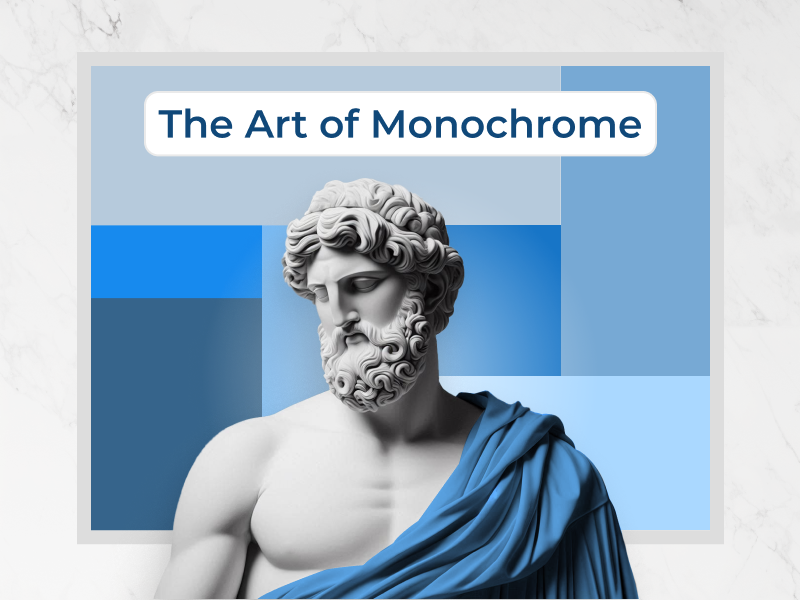
The monochromatic graphic design scheme is one of those trends that never goes out of style. This coloring technique involves using one (mono) color for the entire design.
But this approach is far from being boring or restrictive. While you use a single color, it doesn’t mean applying the same color shade to different areas of your design. Instead, you create a monochrome palette by combining different color variations of the same base.
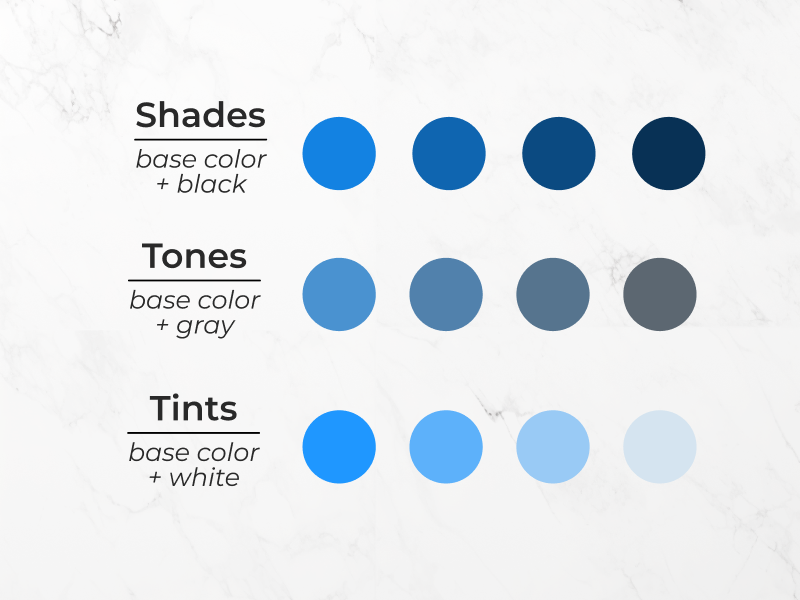
Typically, designers create monochrome schemes by choosing one base color from the 12 on the color wheel and several variations of that base. What type of variations? There are three different options:
Creating a monochrome palette using different shade, tone, and tint variations gives designers a highly versatile spectrum of color options for their projects.
The monochrome effect creates a stylish and harmonious aesthetic you can use to design beautiful website layouts or modern clean logos. Its subtle nature doesn’t draw too much attention to itself, allowing your content to shine. Moreover, using a one-color palette helps users associate it with the brand, enhancing brand identity and recognition.
Ready to experiment with monochromatic color aesthetics? These are best practices and design tips to use this design choice on your next projects:
When embracing the monochrome graphic design style, you will be excited to find out there is a wide range of shades, tones, and tints to choose from. While this allows infinite variations, it’d be best not to go too crazy with your color choices. If you choose too many color variations, at some point, the subtle differences won’t even be distinguishable, and the technique will lose its magic.
You can create a simple but striking design by adopting a monochrome minimalist color palette.
One easy trick to keeping your color choices manageable is to use only as many colors as you have design elements. for example, a three-color layout is a traditional option that consists of a background color, text color, and an accent color for graphic elements.
The same rule applies to brand logo designs, especially illustrated logos with intricate details. Using multiple colors can take attention away from the design. Sticking to two or three hues is enough to create a cohesive and refined design that promotes brand memorability.
Sometimes, as a designer, you have to fit vast information in a limited space. When that’s the case, if you use a multitude of colors, the design can quickly become busy and unorganized. Instead, by embracing a one-color palette, you can make the design cleaner and more organized.
For instance, if you are working on a website layout with multiple illustrations and bold typography, how can you make the design look polished and avoid chaos? By using a simple but aesthetic monochrome palette, you can create unity and consistency across the different elements of your design.

Another interesting use of monochrome palettes in graphic design is their storytelling capabilities. This shows how monochrome graphic designs not only create an aesthetically pleasing visual effect but also enhance design functionality.
Through a monographic scheme, you can show how different features of your design are related or interact with each other, helping users easily understand the purpose of your design.
A simple yet powerful example of this technique involves using a subtle change in color intensity, transitioning from lighter to darker shades to indicate a price progression. The increase in price is directly tied to the color value; the darker the color, the higher the price. This visual cue is a subtle and smart way to make your designs more user-friendly.
A gradient graphic design is also an excellent technique to hold the viewer’s attention. For instance, using gradient transitions on your website design can keep users interested as they scroll down the page. Color tone shifts can keep visitors engaged as you switch to a new section.
One way to create monochrome designs that stand out and captivate viewers is by using bold typography. Typography is much more than an aesthetic element; it is a fundamental component of graphic design.
Choose bold typography that aligns with your design and the brand’s personality. For accessibility’s sake, most designers opt for accessible fonts in black or white to make the text highly legible. However, if you really want to stick to the one-color rule, you can do it, but make sure to create a strong contrast between text and background.
Splitting the design into sections is a key tip for graphic design, but it is especially important for monochrome design. Without clear divisions and sections, your composition can become confusing and overwhelm viewers.
Blocks of color are the perfect design tool for dividing the content into different sections. A split screen web design is a great way to organize the content and create an engaging and easy-to-navigate layout.
In some cases, a full monochrome palette isn’t practical. You can bend the rules a little while still maintaining the visual aesthetic and functionality of a monochrome design. Here are some design ideas to achieve this:
As mentioned above, monochrome color palettes are one of the easiest color trends. Creating a monochrome scheme is relatively simple; you can accomplish it in two quick steps:
The first step in creating a monochrome color palette is selecting your base color. This sounds extremely simple, but which hue should you pick? Any color works – primary, secondary, and even tertiary colors. However, I advise you not to choose a tint, shade, or tone since it would significantly limit your color palette.
Furthermore, you want to base your color selection on the brands’ identity, their intended audience, and the purpose of your design. For example, if your client has a favorite color they use as the brand’s emblem, go with that one. Or, if your design is meant to make a statement, choose a bold color that stands out.
Once you have the main color, it’s time to create the palette. Monochrome schemes typically consist of three to seven color variations of your base hue.
At this step, experiment with darker shades, lighter tints, and duller tones of the base color. Play around and create multiple variations of the original color and then narrow it down to a basic color scheme that you think works for your project.
And that’s it; you have a monochrome color palette you can use to create a visually stunning design.
Are you ready to create your own monochrome color scheme for your next design project?
Besides being visually captivating, monochrome palettes are relatively easy to make, making designers’ jobs easier and faster. Moreover, monochrome designs look polished and professional; they are ideal for when you have to include vast information on reduced spaces or if you want to enhance a client’s branding through its identifying color.
Now it’s your turn to get creative and design a stunning and highly functional monochrome graphic design.
Related Posts
Brian Dordevic
14 Playful Fonts to Inject Personality Into Your Designs
READ MORE
Brian Dordevic
Animated Logo Design: Achieve Instant Brand Recognition
READ MORE
Brian Dordevic
Adaptive Logo: 6 Best Practices To Craft a Responsive Logo Design
READ MORE
Brian Dordevic
Split Screen Web Design: What Designers Should Know About This Trend
READ MORE